How to Use ChatGPT to Learn Hydrological Modelling (III): base R, vibe coding and reproducible projects
Estimated reading time: 20-25 minutes
In this third part we will use ChatGPT as a programming companion for solving hydrological-modelling problems in base R, without tidyverse.
We assume that you have already taken an R course and know the fundamentals: objects, vectors, matrices, data.frame objects, functions, conditionals, loops, basic plotting and the use of packages.
The goal here is not to teach R from the beginning. It is to learn a new workflow:
describe -> generate -> run -> check -> interpret -> modify -> document
This is often called vibe coding: conversational programming with AI support. It can speed up work considerably, but it can also produce convincing-looking code that is conceptually wrong.
In IIO409 the rule should be:
AI may write code. You still remain responsible for knowing what problem the code solves, why it solves it in that way, and how to check whether the result is correct.
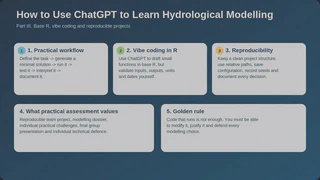
1. What the practical component really assesses
The practical component is:
\[ Practical = 0.25\,PRE + 0.10\,DTM + 0.35\,DPI + 0.10\,PFG + 0.20\,DTI \]where:
- PRE = Reproducible Team Project;
- DTM = Technical Modelling Dossier;
- DPI = Individual Practical Challenges;
- PFG = Final Group Presentation;
- DTI = Individual Technical Defence.
In addition, to pass the practical component you must achieve at least 4.0 in the combined average of the individual components DPI and DTI.
This completely changes how it makes sense to use ChatGPT.
If ChatGPT writes a perfect script but you cannot modify it during an individual challenge or explain a modelling decision in the defence, then the code did not help you learn.
2. Responsible vibe coding
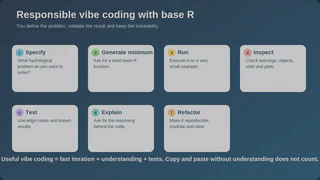
A good workflow has seven steps.
Step 1: specify the problem
Do not begin with:
Write me code to calibrate a model.
First define:
- inputs;
- outputs;
- units;
- temporal resolution;
- model;
- objective;
- constraints;
- success criterion.
Example:
I have daily precipitation [mm/day], mean temperature [°C] and discharge [m3/s]
for a catchment of 850 km2.

I want a base R function that:
1. aligns the series by date;
2. detects missing values;
3. converts discharge to mm/day;
4. returns a data.frame ready for modelling.

Do not use tidyverse.
Before programming, tell me what additional information you need.
Step 2: ask for a minimal solution
Do not ask for 300 lines of code.
Implement the minimum working version first.
Use base R functions.
Do not add optimisation or plotting yet.
Small solutions are easier to verify.
Step 3: run it immediately
Never read a long script and assume it works.
Copy the minimum version, run it and inspect:
str(x)
head(x)
summary(x)
Check sizes:
dim(x)
length(x)
Check missing values:
colSums(is.na(x))
Step 4: inspect the meaning, not only the object
A vector can have the right length and still be conceptually wrong.
Ask:
- Are dates aligned?
- Are the units correct?
- Is the time ordering correct?
- Are there duplicates?
- Are the values physically plausible?
- Have missing values been handled explicitly?
Step 5: test
Ask:
Now create three simple tests that will fail if:
- dates are unsorted;
- discharge is negative;
- the lengths do not match.
For example:
stopifnot(!is.unsorted(dat$date))
stopifnot(all(dat$q >= 0 | is.na(dat$q)))
stopifnot(nrow(dat) == length(dat$date))
Step 6: explain
Explain each decision in the code that could affect the hydrological result.
Do not describe trivial syntax.
This distinction matters.
read.csv() is syntax.
Converting m3/s to a daily depth over the catchment is a quantitative decision that you must understand.
Step 7: refactor
Only afterwards:
Turn the solution into reusable functions.
Add argument validation.
Keep base R and minimal dependencies.
3. Core R skills you still need
ChatGPT can help with syntax, but you must still recognise and understand the following structures.
3.1 Paths and project structure
Avoid:
setwd("C:/Users/my_name/Desktop/Project")
Prefer a project directory and relative paths.
file.path("data", "precipitation.csv")
Ask ChatGPT:
Review this project and identify absolute paths that harm reproducibility.
Suggest replacements using file.path().
3.2 Reading and writing data
You should be comfortable with:
dat <- read.csv("data/input.csv")
write.csv(dat, "results/output.csv", row.names = FALSE)

saveRDS(dat, "results/data_processed.rds")
dat2 <- readRDS("results/data_processed.rds")
Always ask:
What information might be lost if I save this object as CSV rather than RDS?
3.3 Dates
dat$date <- as.Date(dat$date)
For date-time values:
dat$datetime <- as.POSIXct(
  dat$datetime,
  tz = "UTC",
  format = "%Y-%m-%d %H:%M:%S"
)
Date errors can ruin a calibration without necessarily triggering a coding error.
Ask:
Give me tests that help verify whether two hydrological series really represent the same days.
3.4 Subsetting
idx <- dat$date >= as.Date("2000-01-01") &
       dat$date <= as.Date("2010-12-31")

cal <- dat[idx, ]
You should be able to define explicit periods for:
- warm-up;
- calibration;
- verification.
3.5 Missing data
Do not replace NA automatically.
First inspect:
colSums(is.na(dat))
Then decide what to do.
Ask:
I have 2% missing precipitation values.
Do not recommend interpolation immediately.
Ask me about duration, temporal distribution and modelling purpose before suggesting a treatment.
3.6 Functions
The basic unit of a reproducible project should be a clear function.
run_experiment <- function(par, input) {
  stopifnot(is.numeric(par))
  stopifnot(is.data.frame(input))

  # run model
  sim <- ...

  sim
}
Ask ChatGPT to avoid monolithic scripts:
Split this script only when there is a clear functional responsibility.
Do not create unnecessary functions.
3.7 apply, lapply and loops
You should understand both styles.
out <- lapply(files, read.csv)
or:
out <- vector("list", length(files))

for (i in seq_along(files)) {
  out[[i]] <- read.csv(files[i])
}
There is no need to replace all loops with apply functions. The criterion is readability and correctness.
3.8 Base graphics
For diagnostics:
plot(obs, sim,
     xlab = "Observed",
     ylab = "Simulated")

abline(0, 1)
Time series:
plot(dat$date, dat$obs, type = "l")
lines(dat$date, dat$sim)
Residuals:
res <- dat$sim - dat$obs
plot(dat$date, res, type = "h")
abline(h = 0)
Ask ChatGPT:
Do not suggest a plot just because it looks nice.
Tell me what hydrological diagnostic question each plot helps answer.
3.9 Randomness control
For sensitivity, calibration or uncertainty analyses:
set.seed(1234)
The seed should be recorded whenever it matters.
3.10 Error handling
if (!all(required %in% names(dat))) {
  stop("Missing required columns.")
}
For operations that may fail:
ans <- tryCatch(
  run_model(par),
  error = function(e) NA
)
But do not hide errors indiscriminately.
Ask:
In what situations would tryCatch() hide a methodological problem that should actually stop the analysis?
3.11 Packages
Use explicit namespace calls when they improve clarity:
hydroGOF::KGE(sim, obs)
Before trusting a function suggested by AI, check the documentation:
help(package = "hydroGOF")
?hydroGOF::KGE
or consult the official package documentation.
ChatGPT can invent function names or arguments. The documentation is the authority.
3.12 Recording the environment
At the end of an analysis:
sessionInfo()
Save it.
Also record:
- R version;
- packages;
- seed;
- parameters;
- periods;
- input files;
- execution date when relevant.
4. Structure of a reproducible project
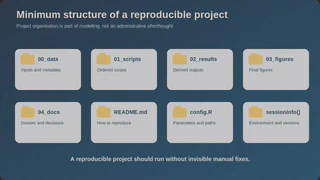
A possible structure is:
IIO409_project/
|
|-- 00_data/
|   |-- raw/
|   `-- processed/
|
|-- 01_scripts/
|   |-- 01_read_data.R
|   |-- 02_qc.R
|   |-- 03_model.R
|   |-- 04_sensitivity.R
|   |-- 05_calibration.R
|   |-- 06_verification.R
|   `-- 07_uncertainty.R
|
|-- 02_results/
|-- 03_figures/
|-- 04_docs/
|-- config.R
`-- README.md
ChatGPT can help you audit this structure:
Act as a reproducibility auditor.
I will paste the file tree and the main scripts.
Identify:
- absolute paths;
- manual steps;
- objects created outside scripts;
- parameters written in multiple places;
- undocumented dependencies;
- result files that cannot be rebuilt.
5. Centralised configuration
Avoid repeating key parameters across many scripts.
cfg <- list(
  warmup_start = as.Date("2000-01-01"),
  calibration_start = as.Date("2001-01-01"),
  calibration_end = as.Date("2010-12-31"),
  validation_start = as.Date("2011-01-01"),
  validation_end = as.Date("2020-12-31"),
  seed = 1234L
)
Then:
source("config.R")
This improves traceability.
6. Working with hydrometeorological data
A sensible workflow is:
read -> validate -> sort -> align -> convert units -> diagnose -> model
Prompt:
I have these columns:
date, p_mm, t_c, q_m3s.

Before modelling, create a quality-control checklist.
For each check:
- explain why it matters hydrologically;
- provide base R code;
- indicate which action should NOT be automated without inspection.
Examples of checks:
stopifnot(!anyDuplicated(dat$date))
stopifnot(!is.unsorted(dat$date))

summary(dat$p_mm)
summary(dat$t_c)
summary(dat$q_m3s)
Negative precipitation:
which(dat$p_mm < 0)
Negative discharge:
which(dat$q_m3s < 0)
Do not delete suspicious values automatically. Investigate them.
7. Converting discharge to a depth
This is a good exercise in both concept and programming.
Ask:
Do not give me the formula immediately.
Make me derive how to convert mean daily discharge [m3/s] into runoff depth [mm/day]
for a catchment with area A [km2].
Check the dimensional consistency of each step.
Then implement it yourself:
q_to_mm_day <- function(q_m3s, area_km2) {
  stopifnot(area_km2 > 0)

  volume_m3_day <- q_m3s * 86400
  area_m2 <- area_km2 * 1e6

  (volume_m3_day / area_m2) * 1000
}
Test it dimensionally and with simple cases.
8. Implementing the hydrological model
For TUWmodel, GR4J or any other model used in the course, avoid asking AI to re-implement everything from scratch if a trusted function or lecturer-provided code already exists.
A better use is:
Here is the documentation of the function we are going to use.
Do not invent arguments outside this documentation.

Explain:
1. inputs;
2. outputs;
3. the meaning of each parameter;
4. units;
5. relevant internal states;
6. three checks to perform before running it.
Then:
Write a base R wrapper to run the model and return:
- the simulation;
- metrics;
- parameters;
- the period.
Include argument validation.
Your wrapper should make the project’s modelling decisions explicit.
9. Sensitivity analysis
Do not begin by asking only:
Do Sobol.
First define:
- parameters;
- ranges;
- output of interest;
- sample size;
- metric;
- seed;
- computational cost.
Prompt:
I want to perform a global Sobol sensitivity analysis.

Before writing code, build with me a decision table with:
parameter, range, justification, output, sample size, seed and expected cost.

Do not choose values arbitrarily without marking them as assumptions.
After you run it:
Here are my first-order and total indices.
Do not interpret them immediately.
Ask me four questions to check whether I understand interaction and dominance.
10. Calibration with PSO
AI can help you configure the experiment, but it should not silently decide:
- bounds;
- objective function;
- period;
- number of particles;
- stopping rule.
Create an explicit objective function.
Skeleton:
objective_function <- function(par, input, obs) {
  sim <- run_model(par, input)

  if (length(sim) != length(obs)) {
    stop("sim and obs have different lengths")
  }

  score <- ...

  score
}
Prompt:
Review this objective function.
Do not change the code yet.

Look for:
- information leakage;
- NA values;
- length mismatches;
- max/min orientation;
- wrong period;
- warm-up dependence;
- units.
If you use hydroPSO, check the documentation of the version actually installed.
Do not trust an argument merely because ChatGPT suggested it confidently.
11. Calibration is not validation
One useful check is:
stopifnot(max(cal_dates) < min(val_dates))
This is only one example, but it captures the idea: encode important decisions as tests.
Ask:
Give me five programmatic tests that reduce the risk of accidentally using
validation data during calibration.
12. Metrics and diagnosis
Do not rely on a single metric.
You may calculate metrics with appropriate packages or verified functions and complement them with diagnostic plots.
Ask:
I have NSE, KGE and PBIAS for calibration and verification.
Do not classify the model yet.
Tell me what additional information I should inspect for three different aims:
1. water balance;
2. low flows;
3. flood peaks.
The same simulation can be useful for one aim and inadequate for another.
13. GLUE and uncertainty
A typical computational workflow involves:
- generating parameter sets;
- running the model;
- calculating a performance measure;
- applying a behavioural threshold;
- analysing the distribution of results;
- building diagnostics.
Ask ChatGPT to work in blocks:
Do not write the whole GLUE analysis in one script.

First design the functions we need and their interfaces.
Then we will implement and test them one by one.
Conceptual example:
evaluate_par <- function(par, input, obs) {
  sim <- run_model(par, input)
  score <- ...
  c(score = score)
}
Before running thousands of simulations, test five.
set.seed(1234)
Then ask:
Which problems might not appear with five simulations but could appear with 100,000?
This introduces issues such as memory, execution time, single-run failures and result storage.
14. Regionalisation
For regionalisation you will probably combine catchment attributes and hydrological signatures.
You should be able to handle basic matrix and data.frame operations.
Example:
attrs <- data.frame(
  basin = c("A", "B", "C"),
  p_mean = c(1200, 950, 1300),
  elev = c(850, 620, 910)
)

d <- dist(scale(attrs[, c("p_mean", "elev")]))
as.matrix(d)
Critical question:
What is the limitation of using scale() and Euclidean distance if attributes have
different distributions, relevance or collinearity?
Programming should lead into methodological discussion.
15. Climate change
Here reproducibility becomes essential because the modelling chain is long.
You can ask:
Design a file structure and a set of functions for a workflow:
climate data -> preprocessing -> bias correction/downscaling -> hydrological model
-> indicators -> period comparison.

Do not write the code yet.
First identify which metadata must be kept to reproduce each step.
Keep separate:
- original data;
- processed data;
- scenarios;
- outputs;
- indicators.
Never overwrite the original inputs silently.
16. Debugging: provide the full error context
Do not write:
It does not work.
Provide:
1. the goal;
2. the minimal code;
3. the full error message;
4. the expected result;
5. the obtained result;
6. the structure of the objects involved.
Prompt:
This is a minimal reproducible example.
Do not rewrite everything.

1. identify the most likely cause;
2. explain which part of the error message supports it;
3. propose the smallest possible change;
4. give me a test that verifies the fix.
The “smallest possible change” prevents unnecessary rewrites of the whole project.
17. When the code runs but the result is wrong
This is the most dangerous situation.
Ask:
The code runs without errors, but the hydrograph looks suspicious.
Give me an ordered diagnostic strategy from the simplest checks
to structural problems in the model.
Do not assume the issue is calibration.
A sound diagnosis should consider:
- data;
- time alignment;
- units;
- warm-up;
- PET;
- parameters;
- objective function;
- implementation;
- conceptual structure.
18. Ask for tests before you optimise
Prompt:
Here is my run_model() function.
Before optimising anything, create a small set of tests.

I want to check:
- arguments;
- dimensions;
- NA handling;
- reproducibility;
- behaviour with out-of-range parameters;
- unit consistency.
You do not need a huge testing framework to benefit from this.
19. PRE (25%): Reproducible Team Project
Use ChatGPT as an auditor, not as an invisible author.
Once a week:
Audit the reproducibility of our current project.

I will give you:
- the file tree;
- README;
- config;
- scripts.

Look for steps that only work because we know manually what to do.
Another helpful review:
Could a third person run this project from scratch?
List everything they would still have to guess.
That prompt usually reveals many weaknesses.
20. DTM (10%): Technical Modelling Dossier
The dossier should explain decisions.
A simple table helps:
| Decision | Choice | Alternative | Justification | Consequence |
|---|---|---|---|---|
| Warm-up | … | … | … | … |
| Objective function | … | … | … | … |
| Parameter range | … | … | … | … |
| GLUE threshold | … | … | … | … |
ChatGPT can challenge the table:
Act as a reviewer.
For each row in this table, formulate one question that would force the team
to justify the decision with evidence or hydrological reasoning.
Do not ask it to invent the justification for you.
21. DPI (35%): Individual Practical Challenges
This is the most important practical component.
Prepare by practising variations, not by repeating the same script.
Here is an exercise that I have already solved.
Create a variation that changes two important conditions.
Do not only change the numbers.

I want it to force me to modify the code and reinterpret the result.
Examples:
- a different period;
- missing data;
- another objective function;
- a parameter at its bound;
- a change of temporal resolution;
- a new catchment;
- a different hydrological aim.
To practise properly:
Do not give me code for the first 15 minutes.
Only answer conceptual questions and review my plan.
22. PFG (10%): Final Group Presentation
ChatGPT can help you remove information, not only add it.
We have 12 results.
Our scientific message is [MESSAGE].

Help us select the four results that are strictly necessary.
For each result we exclude, explain why it is not essential.
Then:
Formulate five difficult questions that a lecturer might ask after the presentation.
23. DTI (20%): Individual Technical Defence
This is probably one of the best ways to use ChatGPT before assessment.
Act as an oral examiner for IIO409.

I will describe our project.
Ask me individual questions about:
- decisions;
- parameters;
- sensitivity;
- calibration;
- performance;
- uncertainty;
- limitations;
- alternative scenarios.

Ask one question at a time.
If my answer is superficial, go deeper.
Do not praise me or give hints too early.
Then:
Change one decision in the project and ask what consequences I would expect.
That is exactly the kind of reasoning you will need in the defence.
24. Git and version control
For a team project, Git is strongly recommended.
Minimum skills:
git status
git add
git commit
git pull
git push
ChatGPT can help interpret errors, but do not execute destructive commands that you do not understand.
Prompt:
Explain this Git conflict.
Do not give me a resolution command yet.
First explain what happened and what information I could lose with each alternative.
25. Minimum README
Your README.md should explain:
1. objective;
2. data;
3. structure;
4. requirements;
5. order of execution;
6. generated outputs;
7. configurable decisions;
8. authors/contact.
Prompt:
Audit this README from the perspective of a person who has never seen the project.
What information is still missing to reproduce it?
26. A template prompt for almost any R problem
Save this one:
Act as a scientific programmer with expertise in R and hydrological modelling.

CONTEXT
[describe data, model, units, period and objective]

TASK
[what you need to achieve]

CONSTRAINTS
- base R; no tidyverse.
- Minimal dependencies.
- Do not invent package functions or arguments.
- Reproducible code.
- Validate inputs.
- Use set.seed() if there is randomness.
- Do not hide important errors.

PROCESS
Before writing code:
1. summarise the problem;
2. identify crucial missing information;
3. propose a minimal strategy.

Then:
4. deliver the code;
5. create a small example;
6. add checks;
7. explain how to validate the result hydrologically;
8. identify possible failure modes.
27. The most important prompt for learning code written by AI
After you receive any script, ask:
Now remove the finished solution from your explanation.

Make me reconstruct this code block by block.
Ask me what each block should do before showing it.
If you cannot reconstruct it, you probably have not learned it.
28. Final rules for vibe coding in IIO409
- Never run 10,000 simulations before testing 5.
- Never calibrate before checking data, units and dates.
- Never use a function suggested by AI without checking the documentation.
- Never accept a metric without looking at the hydrological behaviour.
- Never confuse code that runs with methodology that is sound.
- Never submit a script that you cannot modify.
- Never present a decision that you cannot defend.
- Keep seeds, configuration, versions and metadata.
- Separate raw data, processed data and results.
- Use ChatGPT to test and question your work, not merely to produce it.
The professional skill we want is not simply the ability to write R faster.
It is the ability to build a modelling chain whose logic, code, data, results and limitations you can explain and reproduce.
If you use ChatGPT in this way, AI can speed up mechanical tasks while you concentrate effort on what really matters: thinking like a hydrological modeller.
Recommended references and further reading
- OpenAI. Data analysis with ChatGPT. https://help.openai.com/en/articles/8437071-data-analysis-with-chatgpt
- OpenAI. File uploads FAQ. https://help.openai.com/en/articles/8555545-file-uploads-faq
- OpenAI. How do I create a good prompt for an AI model? https://help.openai.com/en/articles/4936848-how-do-i-create-a-good-prompt-for-an-ai-model
- OpenAI. A student’s guide to writing with ChatGPT. https://openai.com/chatgpt/use-cases/student-writing-guide/
- Bhutani, D. 8 ChatGPT tricks most people still aren’t using. https://www.androidauthority.com/8-chatgpt-tricks-most-people-still-arent-using-3671748/
- eWeek. 10 AI prompting tips that improve ChatGPT, Claude and Gemini. https://www.eweek.com/news/ai-prompting-tips-chatgpt-claude-gemini-2026/